
I’ve written in the past about my dislike for Evernote and near continuous search for an alternative to it. I won’t rehearse my issues with it here but the one that really matters is that I simply can’t stand the interface. I find it hard to pin down precisely what my problem with it is but I feel immensely antipathetic towards using it. It just doesn’t cohere with how I think or with the kinds of information I want to use it to record. The notebooks soon become arbitrary structures, filled with information organised in a sub optimal way and I’m never known how to rectify that state of affairs. To be fair, this was every bit as true when I used to carry organisational clutter around in moleskine notebooks instead: ‘notebooks’ provide too much organisation at the macro level and too little organisation at the micro level. Perhaps for these reasons, I’ve long since come to the conclusion that there’s something about Evernote and something about myself which just isn’t going to be compatible, no matter how many times I hear people who I respect sing its praises. I’ve tried Centrallo, which uses a structure that does work for me, though I realised that in spite of the ontology (I like lists much more than notebooks!) being more suitable, as well as the interface and synching being excellent, it was set up to store much more information than I was ever likely to need it for.
I recently started using Day One journal instead. It’s a carefully designed app, available for iOS and OS X, described as a “simple and elegant journal”. However it’s remarkably feature rich in spite of this simplicity, including reminders, photos, location, automatic backup, iCloud synching, publishing to social media and PDF exports amongst many others. I suspect there’s a risk the developers compromise its ‘elegance’ if they continue to add functionality but at least thus far they have not. The thing that made me fall in love with this app was the experience of writing – in a manner only matched by the Medium blogging platform, it makes writing a pleasure with a lovely distraction-free white screen waiting to be filled, complete avoidance of the lag that often characterises typing on iOS apps, markdown support and oddly satisfying Tweetbot like tapping noises as you type. The entries are filed chronologically, which I realised I associate with blogging these days much more readily than I do an actual journal, though can be favourited and tagged, as well as searched in a variety of ways.
The material I wanted to use Evernote for is probably much more specific than what most people use it for. I want a place to store my plans – I’ve been using Omnifocus for a few years now and I’m so entrenched in this way of reflexively organising my life that I would probably cease to function without it. However Omnifocus is task-orientated – the whole system is designed around the enactment of short, medium and long-term projects as sequences of discrete actions which should only be visible to you at the correct moment. It’s a system designed to overcome procrastination and inertia by offering you a continuing stream of relevant actions which you can take to work towards overarching projects of whatever sort, avoiding overwhelm by shielding the many actions which aren’t relevant (at this particular moment in this particular context) from your awareness. It’s hard to use, literally taking me a year to get to grips with the software, but when it does work it’s difficult to describe how powerful it is. Hence I think the creepy tone which often creeps into discussions about it. The problem with Omnifocus is that it’s not set up to store reference material (in the GTD sense) adequately* – the information which both informs your planning and is required by it, stuff you need to consult in the process of doing things but also to work with as a basis to decide what to do. This is what I’m now using Day One journal for and it really seems to work – I write ad hoc notes in the diary as things occur to me, stuff that I used to put in my Omnifocus inbox but that isn’t actually action orientated and so shouldn’t be in there, which I then review in the same way as I do with Omnifocus. Those thoughts, ideas, realisations etc that are important get tagged and incorporated into a structure which keeps track of the broader perspectives (20,000 to 50,000 feet in GTD terminology) which I’ve found tend to be collapsed into the temporal horizon of a few months at most in Omnifocus:
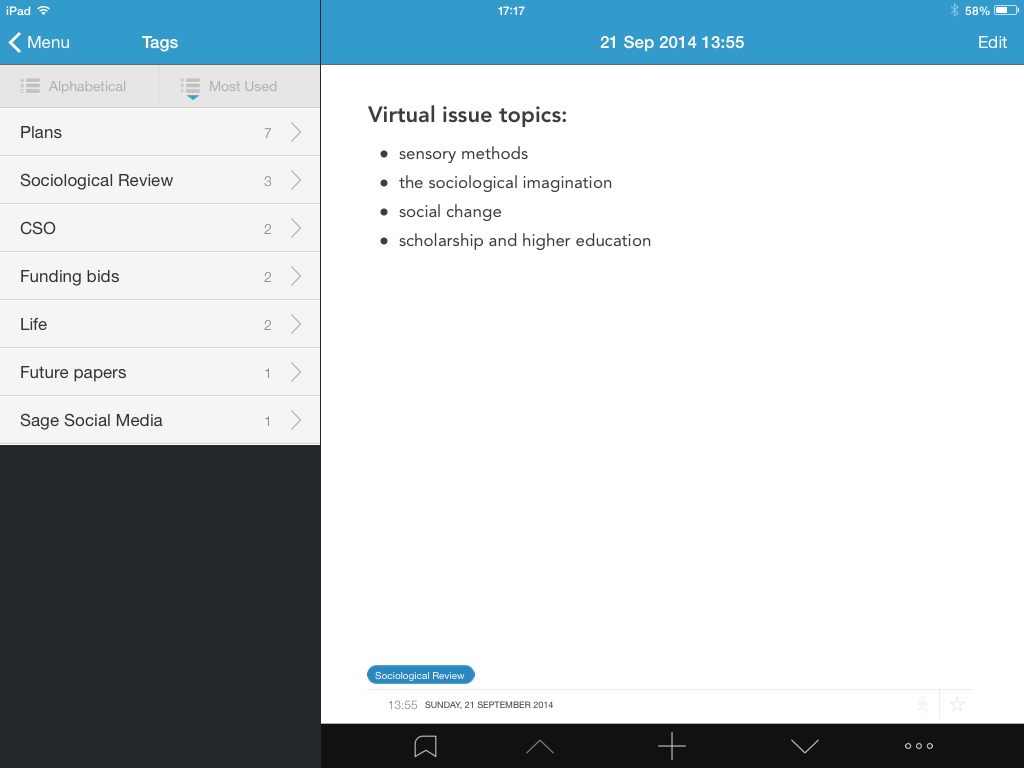
I really like this way of working and it’s the first time I’ve found an app like this which I suspect I’ll stick with. However I think my experience illustrates a broader point about information capture and organisational apps like Evernote: what do you actually want to use it for? What is it you’re trying to capture? How are you trying to organise it? It’s only when we address these questions that we can begin to get a handle on which apps will actually help us do things more effectively in a way that avoids distraction and procrastination. So in that spirit, here are the various apps I use and the purposes I use them for:
- I use my Gmail account as a catch all place to store URLs that I might later want to retrieve. I can access it from anywhere I have an internet connection and everything goes into two folders ‘blogging/twitter’ and ‘reading’ (for academic papers) which then become inboxes of sorts for blogging (particularly for Sociological Imagination) and for research (the papers are unstructured but the reason I’ve saved them is because they’re relevant to a project).
- I use Pocket to capture online stuff (up to and including LRB length long reads) which I want to read but don’t care about saving the citation details for. If I don’t think I’ll pay attention to it when I come across it or if it would distract me to do so then I save it to Pocket. This leaves it accessible on my iPhone and/or iPad at a time which is more conducive to reading it attentively.
- I use Bundlr to organise online stuff for other people. If I think it’s useful to others to collect a package of links and share on Twitter then this is an easy and effective way to do it.
- I use Papership to collect PDFs, bibliographic details and notes I’ve made on journal articles and books etc.
- I use my blog as a commonplace book – extracts, videos or images that I’ve found interesting in some way and want to ensure I can retrieve at a later date (i.e. unlike things in Pocket where I just want to make sure I read them properly).
- I use my blog as a research journal – collecting short thoughts, mini essays, notes on reading, responses to papers etc in a way that I group into thematic tasks and come back to as a resource when I’m doing ‘serious’ academic writing.
- I use Day One to keep track of what I’m doing and why in a general overarching sense.
I suspect Evernote works very well for 1-6. I’m not convinced it works well for 7. Part of the reason I’m writing this post is to disentangle my own use of apps from the broader practical needs they serve because I’m writing a chapter of my social media book on curation tools and managing information at the moment. So if anyone has got this far, I’d love to hear whether activities 1 to 7 map on to your own use of apps and experience of reflexively approaching your work.
*You can add attachments to projects but this atomises overarching plans. There’s no space for ‘big picture’ stuff in Omnifocus.
 Mark Carrigan